“AI-ready” sounds technical, but the idea is simple. Once AI is connected to your system, it can find the data, understand it and give you numbers you can trust, and it won’t see things it shouldn’t.
You don’t necessarily need a new system to get there. Most companies fill the gaps one step at a time, and the order matters more than the tools. Get the order wrong and you often end up with AI that’s hooked up and working, but with answers nobody dares to use.
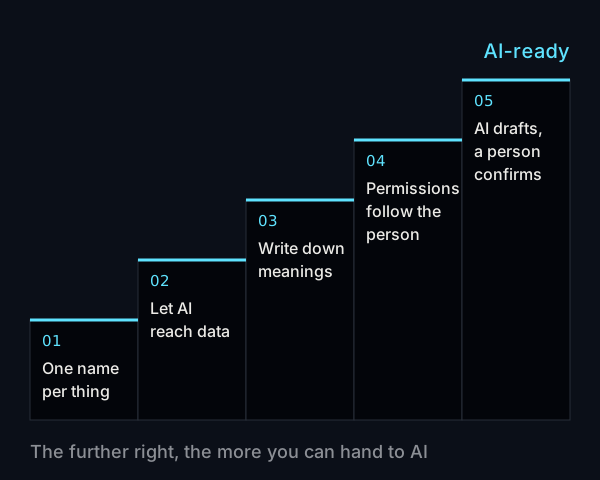
Step 1: One thing, one way of writing it
Start with the topic people ask about most, such as sales or inventory, and clean up the data around it:
- Each product has one item number and one name
- Each customer has one record, not one for “Wang Xiaoming” and another for “Mr. Wang Xiaoming”
- Store, warehouse and sales channel names are consistent
You don’t have to clean up everything at once. Once one topic is tidy, AI answers accurately on that topic. Along the way you’ll probably also find duplicate records that have been slowing down your month-end close all along.
Step 2: Let AI reach the data
AI needs a stable way to read your data. Ideally the system has its own API, so AI can query it whenever it needs to and always get the latest numbers.
If an older system has no API, there are two common compromises:
- Sync data on a schedule to a separate database, and let AI read only that copy
- Export once a day at a fixed time, so AI at least has the previous day’s data
Which one you pick depends on how current the data needs to be. If the owner checks yesterday’s sales every morning, the previous day’s data is plenty. If stores need to check stock at any moment, you need an API.
Step 3: Write down what the data means
The meaning of many fields lives only in the heads of senior staff. This step is about writing it down as a data guide, something like this:
| What the system says | What it actually means |
|---|---|
ST_CD = A01 |
Taipei Xinyi store |
STS = 3 |
Shipped, not yet paid |
AMT |
Amount including tax, in NT$ |
(The table is for illustration only. Every company’s system labels these differently.)
It sounds tedious, but it’s the step people skip most often, and the one that affects accuracy most. You don’t need to finish the guide in one go. Start with the topic you cleaned up in step 1. As a bonus, new hires will have far fewer questions.
Step 4: Make permissions follow the person
When AI looks up data, it should do so as the person asking. If a store manager asks, it only sees that manager’s store. If a salesperson asks, cost and margin stay hidden.
Traditional ERP often manages permissions by blocking screens, so this step may mean changing the system. If that isn’t possible in the short term, at least limit what AI can read. For example, open up sales and inventory only, and keep finance and payroll off-limits for now.
Step 5: Let AI draft, and have a person confirm
Once the first four steps are done, AI can already look up data and answer questions for you. If you want it to start taking action, such as creating purchase orders or adjusting inventory, begin with drafts. AI prepares the content, and nothing takes effect until the person responsible reviews it and clicks confirm.
At the same time, have the system keep a record: which data went into this answer, and who confirmed this order. If a number is questioned later, you can trace it back.
You don’t need all five steps before you start
Here’s how we usually suggest breaking it up:
- After steps 1 and 2: AI can put together daily or weekly data summaries
- After steps 3 and 4: colleagues can ask AI questions directly
- After step 5: AI can take on work that changes data
To get a quick read on where you stand, go through these questions:
- Is all the data needed for your three most common questions in the system?
- Is any of it duplicated, or is the same thing written several different ways?
- Does AI have a stable way to read the data?
- Have the meanings of the main fields been written down?
- If a store manager and an accountant ask the same question, do they see different scopes of data?
- Can AI change data directly?
When to consider replacing the system
Sometimes steps 2 and 4 stay stuck no matter what you try. The vendor no longer supports the system, no API can be opened, and permissions can’t be changed. In that case, shoring it up may cost more than replacing it, and it makes sense to look at a system designed for AI from the start. For the differences, see how traditional ERP compares with AI Native ERP.
If you’re still not sure where to begin, you can also start by trying a single process. We explain how in where small and mid-sized businesses should start with AI.
Common questions
How long does data cleanup take?
It depends on how much data you have and how messy it is. We suggest cleaning up just one topic first. Once that’s done you’ll have a good sense of the overall effort, and you can decide whether to go further.
Does this have to be done by engineers?
For steps 1 and 3, colleagues who know the business are actually better suited than engineers, because they know what the data really represents. Steps 2 and 4 touch the system itself, so you’ll need help from an engineer or your original system vendor.
Once we’re AI-ready, can we use any AI provider?
For the most part, yes. With clean data and an API in place, you can switch to different AI tools later without starting over. That’s one more reason to get the basics right first.
If you’d like to know which step your system is on, book a walkthrough with us and we’ll go through your data and processes together.