Say you run three stores. It’s Monday morning, and you want to know which store sold the most last week and how that compares with the week before.
With a traditional ERP, it goes something like this. You open the system and try to remember which menu the report lives under. You pick the dates, pick the stores, and run it. Then you change the dates and run it again. You export both to Excel and paste them side by side. On a good day that takes ten minutes. On a bad day, you ask the accountant to send it over in the afternoon.
With an AI Native ERP, you type or say: “Sales by store last week, compared with the week before.” A few seconds later the answer is there, with the numbers and a note of which data it looked at.
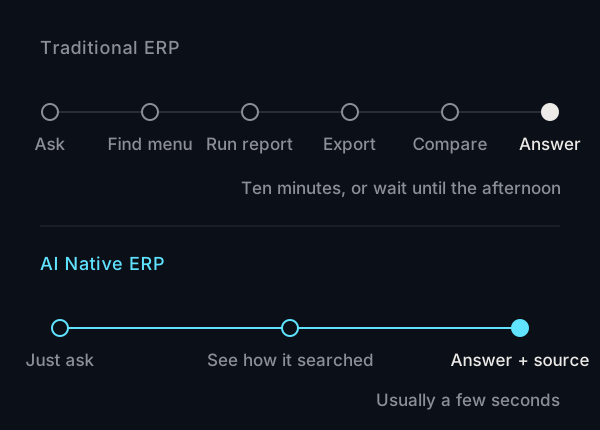
That’s the biggest difference between the two: how far you have to go between having a question and getting an answer.
The data is just as complete. Getting it out is the difference
Let’s be clear: there’s nothing wrong with traditional ERP. Purchasing, sales, inventory and accounting all live in one system, with consistent processes and layered permissions. That still matters today, and an AI Native ERP has to do all of it just as well.
The difference is on the user’s side. Traditional ERP is built around menus and reports. To get an answer, you first have to know which report it’s hiding in. The system has everything, but often only one or two people in the company really know how to use it.
An AI Native ERP is designed on the assumption that people will ask questions the way they normally talk, and that the AI has to find the right answer. So how the data is stored, how fields are named and how permissions work are all set up with that in mind from day one. If you’re wondering why adding AI to an older system takes so much work, see why traditional ERP struggles to connect with AI.
What it looks like in practice
These are real screens from RA Studio’s AI Native ERP. The built-in operations assistant is called Lao Wang. Ask it how the business is doing, and it first shows you what it’s working on: choosing the data, checking the numbers, writing the answer. Only then does it give you the conclusion and the figures.
A few design choices deserve a closer look, because they line up with the worries people most often have about AI.
The system does the math, not the AI
The AI’s job is to understand your question and decide which data to look up. The actual totals, comparisons and percentages are calculated by the system from your data. So you won’t get a number the AI made up on a hunch. Every answer has a “View data” link that shows which tables were used and how many records in total.
If you can’t see it, neither can the assistant
When the assistant looks things up, it uses the permissions of the person asking. It also never creates or changes any records.
What needs doing is right in front of you
On the Overview page, “Today’s tasks” pulls overdue and pending items into one place, so you don’t have to dig through each module. The AI can turn meeting notes into decisions and to-dos, but nothing gets created until a person confirms it.
Side by side
| Traditional ERP | AI Native ERP | |
|---|---|---|
| Finding data | Go into menus, run reports | Ask in plain language, or use the menus as usual |
| What the answer looks like | A report you compare yourself | A conclusion, number cards and a table |
| Where the numbers come from | Check the report settings | “View data” lists the tables and record counts |
| To-dos | Scattered across modules | Collected in “Today’s tasks” |
| Getting new staff started | Training, plus help from experienced colleagues | If they can ask a question, they can start |
All the usual ERP features are still there
AI changes how you use the system. It doesn’t take any of the basics away. The standard modules in AI Native ERP are Overview, Inbox, Decisions, To-dos, Meeting notes, Products, Inventory, Purchasing with restock suggestions, Goods receipts, Suppliers, Sales records, Wholesale orders, POS, and Finance (receivables and payables, trial balance, P&L, balance sheet, 401 VAT filing, month-end close). There’s also ⌘K command search and voice input through your microphone.
For more specific needs, we build features to order. Examples include reading delivery notes and invoices from a photo, turning LINE orders into sales orders automatically (LINE is the main messaging app in Taiwan), and matching bank transactions automatically. Anything the AI produces always shows up as a draft first, for a person to confirm.
To see the whole workflow, watch this recording. It covers the overview, asking questions, meeting notes and restock suggestions.
Which companies should consider it
- Owners or managers who often need up-to-date sales, inventory and purchasing figures
- Businesses with stores, wholesale or several sales channels, where the data lives in different places
- Companies that have the data but no one with time to turn it into reports
On the other hand, if your processes are still changing and each month gets done a little differently, it’s more practical to settle the process first. If your current system still does the job and you just want to try AI, see how to make your ERP AI-ready. To estimate cost and timeline, see how to estimate ERP cost and timeline for a small or mid-sized business.
Common questions
Will the AI get the numbers wrong?
The system calculates the numbers from your data. The AI only decides what to look up. Every answer has “View data”, where you can see which tables and how many records were used, so you can check for yourself.
Can the AI assistant change data directly?
No. The assistant only reads data you have permission to see, and it never creates or changes records. Anything that does need to be created, such as to-dos from meeting notes, has to be confirmed by a person.
Can we bring over data from our current system?
It depends on what formats your current system can export and how clean the data is. RA Studio also does system integration and API work, and we’ll confirm how to move your data during the assessment.
To see whether AI Native ERP fits the way you run your business, book a walkthrough. We’ll show you how it works using your own workflow.