These days almost every ERP claims to have AI. Visit any vendor’s website and you’ll see “AI assistant” and “smart analytics” all over the place. But there are really two kinds of AI behind those labels, and they work very differently once you use them.
One kind is added on top of an existing system. People often call this AI-enhanced. The other kind has been part of the system since the day the blueprints were drawn. That’s AI Native.
A building makes this easier to picture. You can retrofit an elevator into an old walk-up apartment building, and it’s genuinely useful. But the elevator has to go wherever there’s room, and which floors it stops at and which side the doors open on are all limited by the existing structure. A new building is designed with an elevator shaft from the start. The elevator stops at every floor, and the hallways are laid out around it.
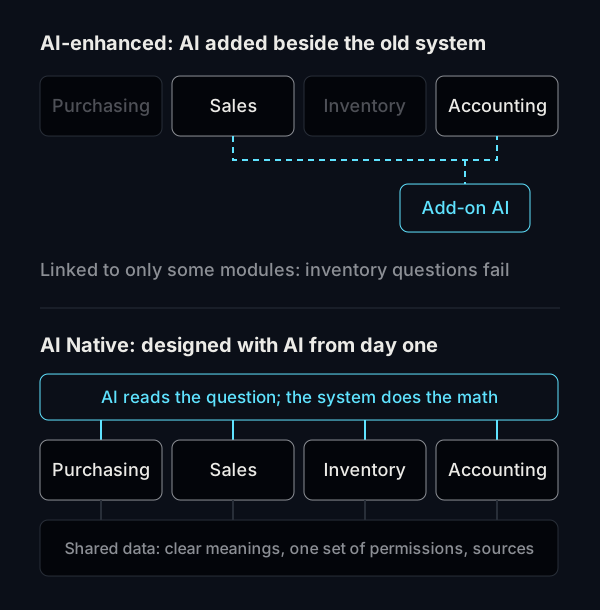
AI-enhanced: an AI added next to the system you already have
Usually this looks like a chat button in the corner of your ERP, or an “AI summary” on certain pages. Behind the scenes, part of your data is typically handed to an AI, which helps interpret it.
The upsides are real:
- You don’t have to switch systems, so your team doesn’t have to learn a new one
- It’s quick to set up and costs relatively little
- It helps with specific jobs, such as summarizing customer complaints or drafting email replies
The limits come from the same place: the AI was added afterward. It runs into every one of the four hurdles described in why traditional ERP struggles to connect with AI. The result is often an AI that only reaches a few modules. It can answer questions about sales but not inventory, and when it hits a field it doesn’t understand, its answers get vague.
AI Native: AI is there from the start
When the way an AI Native ERP stores data is being designed, “the AI will read this” is taken as a given:
- What each piece of data means is clearly defined, so the AI doesn’t have to guess
- Permissions are managed at the data level, and the AI automatically applies the asker’s permissions when it looks things up
- Every answer can be traced to its sources: which data was used and how many records
- When the AI needs to add data, it creates a draft first, and a person confirms it
Because the AI can reach data across the whole system, it can handle questions that need sales and inventory at the same time, like “Which products are selling well this month but running low on stock?”

Side by side
| AI-enhanced | AI Native | |
|---|---|---|
| Where the AI comes from | Added to an existing system | Built in from the design stage |
| What it can look up | Whichever modules are connected | The whole system |
| Questions that span departments | Answers are often incomplete | It can answer them |
| Where the numbers come from | Varies by vendor; some let the AI generate them directly | Calculated by the system, with traceable sources |
| Permissions | Depends on the add-on; may not match the original system | Same as the person asking |
| How you adopt it | Keep your current system and add features | Requires switching systems or rebuilding |
| Best for | Teams happy with their current system who want to try AI | Companies about to adopt or replace an ERP |
How to choose
AI Native isn’t automatically better. It depends on where you are right now.
If your current system works well, everyone’s used to it, and you just want AI to help with one or two things, an add-on is enough. Try it and see.
If you were already planning to switch systems, or your current one has become hard to maintain, going straight to AI Native when you switch is the better deal. Otherwise, a few years from now you’ll be stuck asking “how do we connect AI to this?” all over again.
Here’s a simple test. Pick a question you ask often, one that needs data from more than one department to answer, and ask the vendor to demo it live. Whether the system can answer it, and whether you can trace where the numbers came from, will show you the difference on the spot.
Common questions
How can I tell whether an ERP’s AI is added on or built in?
Ask the vendor three things. Which modules can the AI see data from? How are the numbers in its answers produced? Whose permissions does the AI use when it looks up data? A system designed with AI in mind can usually answer all three in concrete terms.
Can an AI-enhanced system gradually become AI Native?
You can move it in that direction. The steps in making your ERP AI-ready do exactly that. But if the data structure and permissions need a major overhaul, the cost can come close to rebuilding.
If we switch to AI Native ERP, what happens to our old data?
It depends on what formats your current system can export and how clean the data is. We’ll confirm how to move your data during the assessment.
To compare them for yourself, book a walkthrough and we’ll demo it live using the questions you ask most.