A lot of business owners have tried this. Open ChatGPT and ask, “Which of our stores sold the most last month?” It either can’t answer, or worse, it gives you a number that looks completely believable.
The reason is simple: it can’t see your ERP at all. So why not just connect the two? Once you actually try, you find that almost everything that gets stuck has little to do with the AI. The trouble is in the ERP itself.
What you see on screen and what AI has to read are two different things
On the ERP screen you see “Taipei Xinyi store, sales this month: NT$330,405.” Clear at a glance. But that line only exists because the system pieced together several tables and translated them before showing you. What’s actually stored in the database looks more like this.
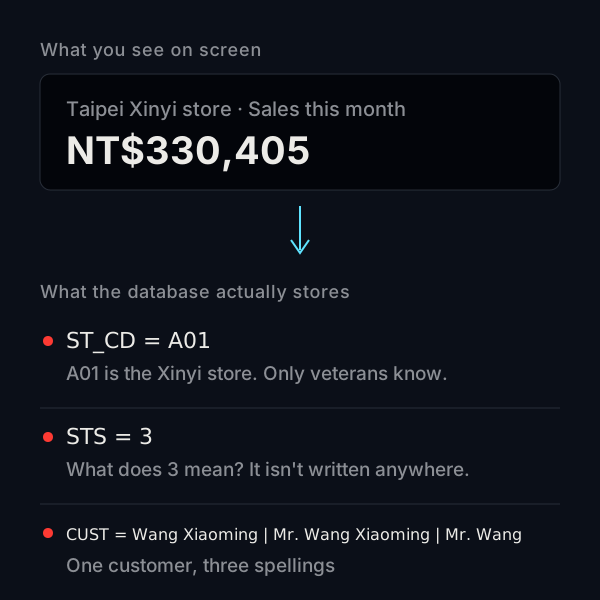
The store is A01. The status is 3. One customer is written three different ways. An accountant who has been with the company for ten years can read this, because they remember what it all means. AI has no such memory. All it sees are the codes.
Many traditional ERP systems got their basic structure before AI ever showed up in the office. Back then the assumed user was a person: someone who looks at the screen, asks a colleague and makes their own judgment call. As long as the screens were right, the system did its job. Few people cared what the data underneath looked like.
Four places where AI gets stuck
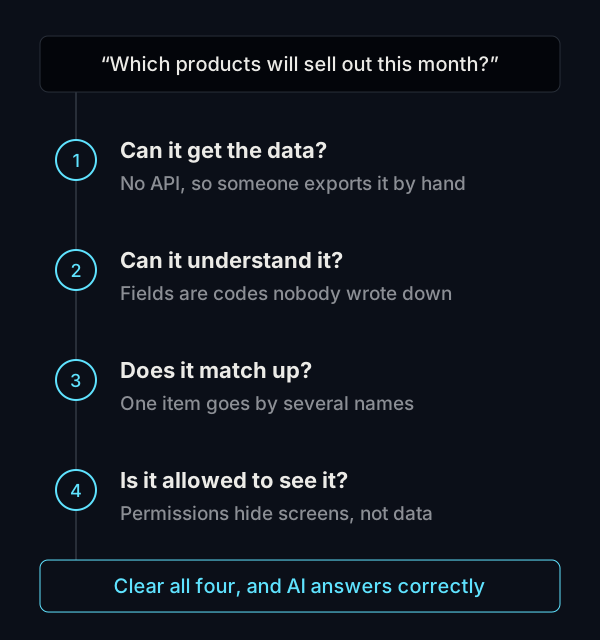
It can’t get to the data
Many traditional ERP systems run on a single server in the company’s own server room, with no outside connection point (what engineers call an API). If you want AI to read the data, someone has to export an Excel file every day and feed it in. The moment data is exported, it starts going stale. Ask a question in the afternoon and you get this morning’s numbers.
Some systems do have an API, but it was built for one specific job, such as letting an online store platform sync orders. If AI wants to look at inventory or accounts receivable, that road is closed.
It can’t understand the data
This is exactly what the diagram above shows. Field names are abbreviations, statuses are numbers, and what they mean lives in a few people’s heads.
When AI runs into something it doesn’t understand, it won’t necessarily stop and say “I don’t know.” It may guess. A wrong number in a report is more dangerous than no number at all, because it looks right.
The data doesn’t match up
The same product is “Fresh Milk 1L” on the purchase order and “Whole Milk 1000ml” at the POS. Some staff type a customer’s full name, others a short version. A person automatically treats these as the same thing. The system doesn’t. When AI runs numbers on data like this, it counts some things twice and misses others.
This isn’t a new problem created by AI. Plenty of companies spend several days closing the books each month, and most of that time goes into matching records by hand. AI just makes the old problem impossible to hide.
It doesn’t know who’s allowed to see what
Traditional ERP usually controls access by screen. If a store manager can’t open the finance pages, that counts as locked down. But AI doesn’t read data through screens. Connect it straight to the database and it can see everything. A store manager casually asks, “How much did the company make this month?” and it may simply tell them.
To keep AI in line, permissions have to move from blocking screens to blocking data. On an old system, that often means major changes.
Can’t you just add an AI chat window?
A lot of products on the market do exactly this: put a chat window next to the old ERP. It works, but it still has to get past the same four gates. The data has to be reachable, readable and consistent, and permissions have to hold. If any one of these isn’t handled, the chat window can only answer surface-level questions, or its answers aren’t very reliable.
We wrote about the difference between bolting AI on and designing for it from the start in how AI-enhanced ERP differs from AI Native ERP.
This doesn’t mean throwing out the old system
After all these problems, the takeaway is not “traditional ERP is useless.” It can still keep the books, track inventory and run your processes. It just wasn’t built with AI in mind.
Whether to replace it, and how to fill the gaps, depends on which gate your system is stuck at. If the data is messy, clean it up first. If AI can’t reach it, open an API first. If permissions aren’t sorted, sort those out first. We laid out the order in how to make your ERP AI-ready.
Common questions
My ERP can export to Excel. Does that count as being connected to AI?
It’s a fine way to start experimenting. For example, export sales data once a week and ask AI to help spot trends. But if you want answers in real time, or want AI to look up data according to each person’s permissions, export files won’t be enough.
Don’t cloud ERP systems avoid these problems?
With cloud ERP it’s usually easier to get an API, so the first gate is a bit easier to pass. But whether the fields make sense, whether the data matches up and how permissions are managed have little to do with where the system is hosted.
How do I tell which gate my system is stuck at?
Pick a question you ask often, like “Which products are about to sell out this month?” Then count how much manual work it takes to get the answer out of the system. The more cleanup in between, the more gates you’re stuck at. If you’d like someone to look at it with you, talk to us.